
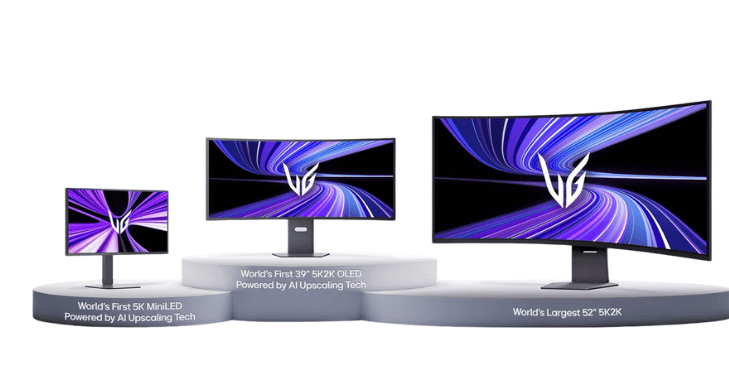
Last updated: 7 August 2026. LG’s 5K2K line looks simple from the outside — one resolution, 5120 × 2160, across every model. It is not. As of August 2026 LG sells 5K2K panels built on three different display technologies, at four screen sizes, with a 2.4× spread in real-world desktop brightness and two incompatible DisplayPort generations. Two of them are 165 Hz OLEDs that look almost identical on a spec sheet and behave very differently on an actual desk.
This guide covers every LG 5K2K model on sale right now with current US pricing, the pixel and PPI maths that decides whether the resolution is worth it for you, the bandwidth requirements that determine whether you need DSC or a DisplayPort 2.1 graphics card, the known problems (including a macOS scaling bug that is still unresolved), and how 5K2K stacks up against the alternatives at the same money.

Short answer: which LG 5K2K should you buy?
- Best text clarity and the best OLED overall: LG UltraGear evo 39GX950B-B — 39″, 4th-gen Primary RGB Tandem panel, 1500R, DisplayPort 2.1 UHBR20. Around $1,599.
- Best for work and docked laptops: LG UltraFine 40WT95UF-W — IPS Black, 450 nits full-screen, dual Thunderbolt 5 with 96 W charging, Ethernet, KVM. Around $1,499.
- Most immersive for gaming and film: LG UltraGear 45GX950A-B — 44.5″, 800R curve, 1,300-nit highlights. Around $1,499 (down from a $1,999 MSRP).
- Highest refresh rate: LG UltraGear evo 52G930B — 52″, 240 Hz, but it is a VA panel, not OLED. Around $1,999.
- Skip it: the older 40WP95C-W. It is still listed, but at 72 Hz and 300 nits it has been comprehensively replaced by the 40WT95UF.
What 5K2K actually is — and the PPI numbers nobody quotes
5K2K means 5120 × 2160 pixels in a 21:9 aspect ratio. The cleanest way to think about it: 5K2K is a 4K screen with a 1280 × 2160 sidebar permanently attached. The vertical resolution is identical to 4K; you are buying 33% more horizontal space.
That framing matters because pixel density — not resolution — determines how big text looks. The 5120 × 2160 panel has a diagonal of 5,556.98 pixels, so PPI falls away quickly as the screen grows:
| Display | Pixels per inch | Text size feels like |
|---|---|---|
| 5K2K at 39″ (39GX950B) | 142.5 | Slightly sharper than a 32″ 4K |
| 5K2K at 39.7″ (40WT95UF, 40WP95C) | 140.0 | Essentially identical to a 32″ 4K |
| 5K2K at 44.5″ (45GX950A) | 124.9 | Between 27″ 1440p and 32″ 4K |
| 5K2K at 52″ (52G930B) | 106.9 | About the same as 27″ 1440p |
| 4K at 27″ | 163.2 | Reference for “retina-class” desktop |
| 4K at 32″ | 137.7 | — |
| 3440 × 1440 at 34″ | 109.7 | — |
| 5120 × 1440 at 49″ | 108.5 | — |
The practical takeaway: a 40″ 5K2K gives you a 32″ 4K experience with a third more width at the same text size. A 45″ 5K2K does not — at 125 PPI it is noticeably coarser, closer to 1440p density. If you read code or documents all day, the 39″/40″ models are the ones to look at. Nothing in the 5K2K family reaches a 27″ 4K panel’s 163 PPI.
Every LG 5K2K model compared (August 2026)
| Model | Size / panel | Curve | Refresh | Peak HDR | Full-screen SDR | Video input | Street price |
|---|---|---|---|---|---|---|---|
| 39GX950B-B UltraGear evo | 39″ 4th-gen Primary RGB Tandem WOLED | 1500R | 165 Hz / 330 Hz at 2560×1080 | ~1,430–1,500 nits | 335 nits | DP 2.1a UHBR20, 2× HDMI 2.1, USB-C 90 W | ~$1,599 |
| 45GX950A-B UltraGear | 44.5″ WOLED with MLA+ (RGWB) | 800R | 165 Hz / 330 Hz at 2560×1080 | 1,300 nits at 1.5% APL | 263 nits | DP 2.1 UHBR13.5 + DSC, 2× HDMI 2.1, USB-C 90 W | ~$1,499 |
| 40WT95UF-W UltraFine | 39.7″ IPS Black LCD | 2500R | 120 Hz | over 600 nits | 450 nits | 2× Thunderbolt 5 (96 W), DP 2.1, 2× HDMI, RJ45 | ~$1,499 |
| 52G930B UltraGear evo | 52″ VA LCD | 1000R | 240 Hz | 600 nits | 320–400 nits | DP 2.1 UHBR13.5, HDMI 2.1, USB-C 90 W | ~$1,999 |
| 40WP95C-W (2021) | 39.7″ Nano IPS | 2500R | 72 Hz | — (HDR10 only) | 300 nits | Thunderbolt 4 96 W + TB4 out | ~$1,300–1,800 |
Colour coverage runs 95% DCI-P3 on the VA and IPS models, 98–98.5% on the 45GX950A and 99.5% on the 39GX950B. HDR certification: DisplayHDR True Black 500 on the 39GX950B, True Black 400 on the 45GX950A, DisplayHDR 600 on the two LCD models.
The one spec that separates the 2026 OLEDs from the 2025 ones
The 39GX950B uses LG Display’s 4th-generation Primary RGB Tandem panel, and it is the single biggest reason to buy a 2026 5K2K OLED rather than last year’s. Two things changed:
- Brightness is up about 28% in the mode that matters. Peak HDR headline figures barely moved, but full-screen SDR brightness — the number that governs how a spreadsheet looks in a bright room — went from 263 nits on the 45GX950A to 335 nits on the 39GX950B.
- Text fringing is effectively solved. Older WOLED panels put a white subpixel in an unusual order, which made Windows ClearType render coloured edges on small text. TFT Central’s review of the 39GX950B concluded fringing is now resolved for the vast majority of users. The 45GX950A’s RGWB layout is already a big improvement on the older RWBG arrangement, but the 2026 panel is the cleaner one.
If you have read older reviews warning you off ultrawide OLEDs for text work, that advice is now out of date — but only for the newest panels. For broader context on how these panels behave, see our guide to the best OLED gaming monitors and our 4K OLED gaming monitor breakdown.
Can your graphics card actually drive it? The bandwidth maths
This is where most 5K2K buying guides stop being useful. Driving 5120 × 2160 at high refresh rates needs more bandwidth than a single uncompressed DisplayPort link can carry. Here is what the signal actually requires (CVT-RB v2 timing):
| Refresh rate | 8-bit colour | 10-bit colour |
|---|---|---|
| 120 Hz | 33.07 Gbps | 41.33 Gbps |
| 144 Hz | 39.68 Gbps | 49.60 Gbps |
| 165 Hz | 45.47 Gbps | 56.83 Gbps |
| 240 Hz | 66.13 Gbps | 82.67 Gbps |
And here is what each connection can carry:
| Link | Usable bandwidth |
|---|---|
| DisplayPort 1.4 (HBR3) | 25.92 Gbps |
| HDMI 2.1 (FRL 12G × 4) | 42.67 Gbps |
| DisplayPort 2.1 UHBR13.5 | 52.36 Gbps |
| DisplayPort 2.1 UHBR20 | 77.58 Gbps |
Put those together and the conclusion is blunt: 5K2K at 165 Hz and 10-bit colour needs 56.83 Gbps, which exceeds UHBR13.5, HDMI 2.1 and DisplayPort 1.4 alike. Every 5K2K OLED therefore relies on Display Stream Compression except one.
- The 45GX950A tops out at UHBR13.5, so it always runs with DSC. In practice DSC is visually lossless and nothing is wrong with this — it just means the link is compressed.
- The 39GX950B supports UHBR20, so with a certified DP80 cable and a modern GPU it can run 165 Hz uncompressed. It also falls back gracefully to DSC over DisplayPort 1.4 on older cards.
- With DSC engaged, 165 Hz needs only about 20 Gbps — comfortably inside DisplayPort 1.4. Any DisplayPort 1.4 GPU from the last several generations will run these monitors at full refresh. You do not need a new graphics card.
UHBR20 is the exception: it needs a current-generation card such as an RTX 5080 Super or RTX 5070 Ti Super class GPU. It is a nice-to-have, not a requirement.
The Mac problem you should know about before buying
Apple Silicon Macs drive 5120 × 2160 without trouble, but there is a long-standing scaling issue that LG cannot fix. On M4-generation Macs, the 3840 × 1620 HiDPI scaled option disappeared from Display Settings on these monitors — an option that M1 machines expose on the very same hardware. That leaves users choosing between a native 5120 × 2160 desktop where the interface is uncomfortably small, or a scaled mode where text looks soft.
The common workaround is the third-party utility BetterDisplay, which restores the missing modes for many people but not all. As of this update we could not verify that Apple has shipped an official fix. If you are buying a 5K2K panel primarily for a recent Mac, budget for that friction or check current reports for your exact model before ordering.
The honest drawbacks
- Full-screen brightness on OLED is modest. 263 nits on the 45GX950A and 335 nits on the 39GX950B, against 450 nits on the IPS Black 40WT95UF. In a bright, sunlit room the LCD is the more comfortable screen, and it is not close.
- The 45″ 800R curve fights productivity software. Reviewers consistently note that an 800R curve visibly distorts applications designed to be viewed flat. The 1500R on the 39GX950B and the gentle 2500R on the UltraFine models are far better suited to desk work.
- LG’s burn-in warranty is two years, and it is residential-only. Cover applies to normal personal use of the monitor as a home PC display and explicitly excludes commercial or signage use. For comparison, Dell ships the competing Alienware panel with a three-year burn-in warranty.
- No 240 Hz 5K2K OLED exists yet. LG’s 240 Hz 5K2K is the VA-panel 52G930B. If you want both OLED response times and 240 Hz at this resolution, that product is not on the market.
- The 39GX950B omits some OLED-care features found elsewhere in the range, including pixel shift, logo detection and taskbar detection, and its dual-mode does not use true integer scaling.
5K2K versus the alternatives at the same price
A 5K2K panel is 11,059,200 pixels. Here is how that compares:
| Alternative | Total pixels | Verdict against 5K2K |
|---|---|---|
| 32″ 4K (3840 × 2160) | 8,294,400 | 5K2K has 33% more — same height, wider canvas |
| Two 27″ 4K panels | 16,588,800 | Dual 4K has 50% more pixels and usually costs less |
| 34″ ultrawide (3440 × 1440) | 4,953,600 | 5K2K has 123% more — more than double |
| 49″ super-ultrawide (5120 × 1440) | 7,372,800 | Same width, but 5K2K adds 720 more vertical pixels |
Two honest conclusions come out of that table. First, against a 49″ super-ultrawide, 5K2K wins clearly — identical horizontal space plus 720 extra rows, which is the difference between seeing 40 lines of code and 60. Second, against two 27″ 4K monitors, 5K2K loses on raw pixels and on price. Its case there is the absence of a bezel down the middle, one cable to the laptop, and one KVM — not pixel count. If a centre bezel does not bother you, dual 4K is the better value. Our 4K curved monitor guide and budget monitor picks cover those routes.
Non-LG 5K2K options
| Model | Size / panel | Refresh | Notable | Price |
|---|---|---|---|---|
| Dell U4025QW | 39.7″ IPS Black, 2500R | 120 Hz | Thunderbolt 4 with 140 W charging, RJ45, KVM, DisplayHDR 600 | from ~$1,500 |
| Alienware AW3926QW | 39″ 4th-gen Tandem WOLED, glossy, RGB-stripe | 165 / 330 Hz | DP 2.1 UHBR20, HDMI 2.1 eARC, True Black 500, Dolby Vision, 3-year burn-in warranty | TBA, autumn 2026 |
| Samsung ViewFinity S85TH | 40″ VA, 1000R | 144 Hz | Thunderbolt 5 80 Gbps / 140 W with TB5 passthrough, RJ45, KVM | Not yet announced |
| Philips 40B1U6903CH | 39.7″ IPS, curved | 75 Hz | Thunderbolt 4 90 W, pop-up webcam, RJ45 | Not published |
The Alienware AW3926QW is the one to watch: it uses the same 4th-generation panel generation as the 39GX950B but in a glossy finish with an RGB-stripe subpixel layout and a longer burn-in warranty. Pricing had not been announced at the time of writing.
Two buying traps to avoid
- The “45-inch LG UltraGear OLED” that is not 5K2K. LG sells a 45″ OLED called the 45GX90SA-B which is 3440 × 1440, not 5120 × 2160 — roughly 92 PPI against the 5K2K model’s 125. It appears in discount roundups at prices far below the 45GX950A-B, and the model numbers differ by only a few characters. Check for 950 in the name and confirm the resolution before you buy.
- The bendable 45GX990A. It was announced with an estimated European price around €2,499, but LG’s US product page returns a 404 and we found no US retail listing. Treat it as unavailable in North America rather than as a shipping product.
Who should actually buy a 5K2K monitor?
- Developers, analysts and anyone living in wide timelines or wide spreadsheets. The 39″/40″ models at ~140 PPI give you 4K-class text with a third more width, which is the single strongest argument for the format.
- Laptop users who want a one-cable desk. The 40WT95UF and Dell U4025QW deliver display, data, network and 96–140 W of charging over a single Thunderbolt cable, with a KVM for a second machine.
- Gamers who value field of view over frame rate. 165 Hz is plenty for most titles and the 21:9 canvas is genuinely more immersive than 16:9.
- Not for you if: you need maximum pixels per dollar (buy two 4K panels), you work in a very bright room and want OLED (buy the IPS Black model instead), or you play competitive shooters where 240 Hz-plus matters more than resolution.
Frequently asked questions
What is a 5K2K monitor?
A display with a resolution of 5120 × 2160 pixels in a 21:9 ultrawide aspect ratio. It has the same vertical resolution as 4K but 1,280 more horizontal pixels — about 33% more screen area than a 4K monitor of the same height.
Which LG 5K2K monitor has the best text quality?
The 39GX950B-B. At 142.5 PPI it is the densest panel in the range, and its 4th-generation Primary RGB Tandem structure largely eliminates the coloured text fringing that affected earlier WOLED ultrawides. Among the LCD models, the 40WT95UF at 140 PPI is also excellent and considerably brighter for all-day office work.
Do I need a DisplayPort 2.1 graphics card for 5K2K at 165 Hz?
No. With DSC enabled, 5120 × 2160 at 165 Hz needs roughly 20 Gbps, which fits comfortably within DisplayPort 1.4’s 25.92 Gbps. Any reasonably recent DisplayPort 1.4 GPU will drive these monitors at full refresh. DisplayPort 2.1 UHBR20 only matters if you specifically want an uncompressed link on the 39GX950B.
Is 5K2K better than two 4K monitors?
Not on pixels or price. Two 27-inch 4K panels give you 16.6 million pixels against 5K2K’s 11.1 million, and usually cost less. 5K2K wins on having no bezel through the middle of your workspace, a single cable to a laptop, and one built-in KVM. Choose on whether the centre bezel bothers you.
How much brightness do LG 5K2K OLEDs lose in normal desktop use?
A lot more than the headline figure suggests. The 45GX950A peaks at 1,300 nits on a small highlight but measures about 263 nits across a full white screen; the newer 39GX950B manages about 335 nits. The IPS Black 40WT95UF holds 450 nits full-screen. For bright rooms and static office work, the LCD is the more comfortable choice.
Does LG cover OLED burn-in under warranty?
Yes, for two years in the US, conditional on normal personal use as a home computer monitor. Commercial and signage use is explicitly excluded. Dell offers three years of burn-in cover on the competing Alienware AW3926QW.
Is there a 240 Hz 5K2K OLED?
Not yet. LG’s 240 Hz 5K2K monitor, the 52G930B, uses a VA LCD panel rather than OLED. Every 5K2K OLED currently on sale runs at 165 Hz, with a 330 Hz dual mode that drops the resolution to 2560 × 1080.
Will a 5K2K monitor work properly with a Mac?
It will run at native resolution, but M4-generation Macs lost the 3840 × 1620 HiDPI scaled mode that older Apple Silicon Macs offer on the same displays, which leaves the interface either very small or slightly soft. The third-party BetterDisplay utility restores it for many users. We could not confirm an official Apple fix as of August 2026.