

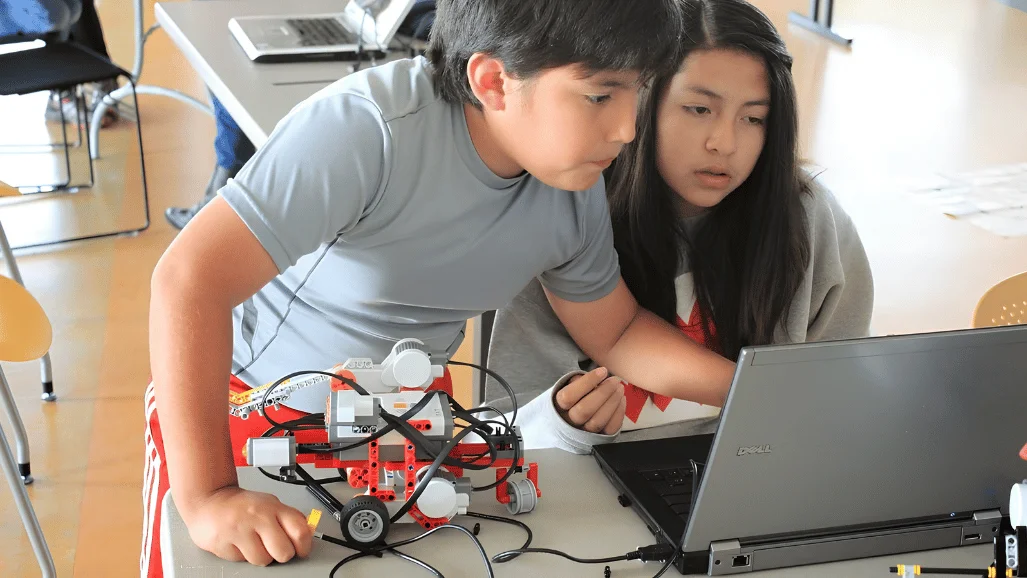
Robotics for kids turns science, coding, and engineering into something children can build, test, and see move. Instead of learning technology only through a screen, children work with motors, sensors, gears, and simple programs. That physical feedback can make abstract STEM ideas easier to understand.
Direct answer: Robotics introduces children to coding, engineering, electronics, and problem-solving through hands-on projects. Beginners can start with simple sequencing activities before moving to programmable robots and sensors. The right starting point depends more on developmental readiness and interest than one fixed age.
| Quick fact | What parents should know |
|---|---|
| Good starting age | Simple activities can begin around ages 5–7. |
| Beginner focus | Building, sequencing, movement, and cause-and-effect |
| Ages 8–12 | Block coding, sensors, motors, and structured projects |
| Teens | Python, Arduino-style boards, electronics, and advanced projects |
| Prior coding needed? | Usually not for beginner activities |
| Main learning areas | Coding, engineering, design, debugging, and computational thinking |
| Home or class? | Both can work when projects match the child’s level |
| First goal | Complete a small working project without unnecessary complexity. |
Key Takeaways
- Young children can begin with screen-free sequencing and simple programmable robots.
- Elementary-age learners can progress to block coding, motors, and sensors.
- Older children can explore electronics, text-based programming, and independent designs.
- Expensive hardware is unnecessary for a child’s first robotics experience.
- Good projects encourage experimentation instead of requiring one perfect solution.
- Parents should choose tools based on ability, interest, and supervision needs.
What Is Robotics for Kids?
Robotics for kids is an age-appropriate way to explore how machines sense, process instructions, and perform actions. Children might build a wheeled robot, program a route, or make a sensor respond to obstacles. Each project connects software instructions with a physical result.
That connection separates robotics from many screen-only activities. A coding mistake might make a robot turn incorrectly or stop before reaching its target. Children can then change the program, test again, and observe the result.
This process introduces computational thinking without requiring advanced mathematics. A systematic review examined 22 studies involving learners from pre-kindergarten through sixth grade. Sequencing, loops, conditionals, debugging, and algorithmic thinking were among the commonly studied skills.
Parents exploring related technology concepts can also browse Techirya’s AI Tech coverage. It provides broader context about computing, automation, and emerging technology. That context becomes more useful as children progress toward advanced projects.
What Age Should Kids Start Robotics?
There is no universal starting age for robotics. Children develop reading ability, patience, fine motor skills, and problem-solving confidence at different rates. A suitable activity should match those abilities instead of following a rigid age label.
Children around ages five through seven can explore sequencing, directions, and cause-and-effect with simple programmable toys. They do not need to understand programming syntax. The goal is learning that a sequence of instructions produces predictable actions.
Ages eight through twelve can usually handle more structured building and visual programming. Projects can introduce motors, distance sensors, loops, and conditional instructions. Children in this range may also start documenting what went wrong during testing.
Teenagers can move toward microcontrollers, circuits, Python, or other text-based programming languages. They can also design projects with fewer step-by-step instructions. Their progress should still depend on experience rather than age alone.
Research supports using developmentally appropriate approaches with younger learners. A 2026 systematic review examined 53 kindergarten robotics studies and highlighted problem-based learning, storytelling, and instructional support. It also found that assessment methods across studies remain inconsistent.
Robotics for Kids by Age and Learning Stage
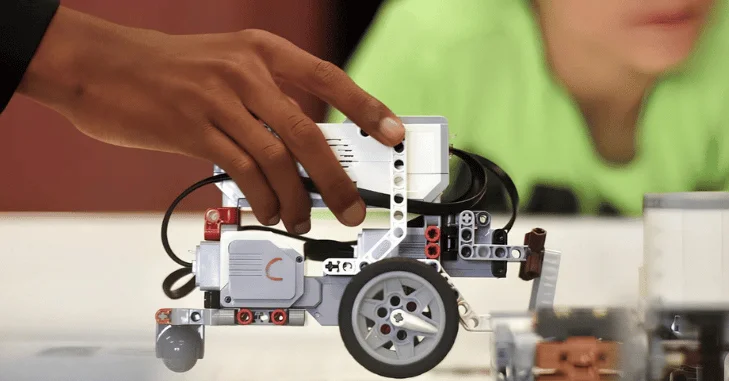
| Learning stage | Good starting activities | Coding approach | Main goal |
|---|---|---|---|
| Ages 5–7 | Movement games, sequencing robots, simple building | Screen-free or visual commands | Cause-and-effect |
| Ages 8–10 | Moving robots, basic sensors, simple challenges | Block coding | Logic and debugging |
| Ages 11–13 | Multi-sensor projects and basic electronics | Blocks or beginner text coding | Systems thinking |
| Ages 14+ | Microcontrollers, custom designs, automation | Python, C++, or platform languages | Independent engineering |
These age bands should be treated as guidance rather than strict requirements. A motivated eight-year-old may progress quickly, while an older beginner may prefer simple projects first. Starting at the correct difficulty matters more than starting early.
Parents should also check manufacturer age recommendations before buying hardware. Small parts, batteries, soldering equipment, and exposed electronics may require adult supervision. Safety requirements become especially important when projects move beyond enclosed educational kits.
Why Robotics Can Be Valuable for Children
Robotics combines several subjects inside one practical challenge. A moving robot may involve measurement, mechanical design, electrical components, and programming logic. Children see why different STEM subjects connect instead of studying each topic separately.
The strongest evidence concerns areas such as computational thinking and programming-related skills. Research should not be interpreted as proving that any robot kit automatically improves every academic ability. Project design, instruction, engagement, and practice all influence learning.
A 2023 systematic review found educational robotics was commonly used to support computational-thinking development in young learners. The reviewed activities often included collaborative, project-based, and embodied learning approaches. These methods give children opportunities to solve problems through repeated testing.
More recent evidence also suggests promising results while supporting careful interpretation. A 2026 systematic review found generally positive outcomes across several learning measures. Its authors also warned that study quality and effect sizes varied considerably.
Robotics Makes Debugging Visible
Debugging can feel abstract when children only see lines of code. A physical robot makes many mistakes immediately visible. The machine may turn too early, miss an object, or follow the wrong route.
Children can investigate whether the problem came from code, construction, or a sensor. That encourages them to break one large problem into smaller questions. Finding the cause becomes part of the project rather than a separate lesson.
Robotics Encourages Building and Testing
A useful robotics activity rarely ends after assembling parts. Children should predict what will happen, test the design, and make changes. That cycle resembles the basic engineering design process.
Failures can therefore provide useful information. A wheel slipping or a sensor misreading an obstacle gives the learner something specific to investigate. The important lesson becomes improving a design rather than producing perfection immediately.
Robotics vs. Coding: What Is the Difference?
Coding focuses on creating instructions that computers can process. Robotics uses programming while adding mechanical parts, electronics, sensors, and physical movement. The subjects overlap, but they are not identical.
A child who enjoys designing games may prefer coding without hardware. Another child may understand programming better after seeing a motor respond to instructions. Neither route needs to replace the other.
Robotics also introduces practical variables that ordinary software projects may avoid. Battery power, wheel friction, loose components, and sensor placement can change results. Children learn that correct code does not always guarantee correct physical behavior.
As digital skills grow, basic web literacy can also become useful. Techirya’s guide to understanding URLs explains how web addresses work. That knowledge can help older learners understand online documentation and project resources.
What Should a Beginner Learn First?
A first robotics project should be small enough to finish. Children do not need artificial intelligence, advanced electronics, or complicated programming during their first session. Early success gives them a foundation for harder experiments.
A sensible beginner sequence includes:
- Learn what the robot or controller can do.
- Build one simple moving mechanism.
- Create a short sequence of commands.
- Test the sequence and observe the result.
- Change one instruction or physical component.
- Add a sensor after basic movement works.
- Explain what changed and why.
This sequence keeps the learning goal visible. It also separates basic movement from more complicated sensing and decision-making. Children can identify problems more easily when only one new concept appears at a time.
Kit at Home or Robotics Class?
Home kits offer flexibility and time for open-ended exploration. Children can revisit a project without waiting for the next lesson. Parents should expect to provide some help with instructions, organization, and troubleshooting.
Classes provide structure, instructors, and opportunities to work with other learners. They can be useful when a child needs guidance after getting stuck. Quality matters more than whether the program happens online or in person.
Before enrolling, ask what students build independently. Also ask how instructors handle mistakes and whether every learner gets meaningful programming time. A class dominated by demonstrations offers less hands-on practice.
For home projects, keeping software and instructions organized can prevent unnecessary frustration. Techirya’s guide to downloads on this phone can help with basic file management. Older children may need these skills when saving project files or instructions.
How to Choose a Robotics Kit for a Child
Start with the child’s current skills rather than the most advanced product available. A sophisticated kit can become frustrating when assembly or software requires constant adult intervention. A simpler platform can provide more independent learning.
Look for clear instructions, replaceable parts, and projects that increase gradually in difficulty. Beginner kits should make early experiments possible without extensive wiring. Older learners may benefit from platforms that allow custom components and text-based code.
Consider these factors before buying.
- Manufacturer’s recommended age.
- Reading and building difficulty.
- Block-based or text-based programming.
- Number and type of sensors.
- Replacement-part availability.
- Device and operating-system compatibility.
- Quality of tutorials and project documentation.
- Adult supervision requirements.
- Expansion options after beginner projects.
Avoid buying solely because a kit promises advanced technology. A child learns more from a simple project they understand than a complex project assembled by an adult. The learner should make meaningful decisions during the build.
A Simple First Robotics Challenge
A basic navigation challenge requires only movement and simple programming. Mark a start and finish point on the floor or table. Ask the child to program the robot to reach the destination.
Do not immediately correct an unsuccessful attempt. Ask where the robot moved differently from the prediction. Then encourage one change before running the program again.
The project can grow after the basic route works. Add a turn, obstacle, or stopping zone. Older children can measure distance and compare predicted movement with actual movement.
This challenge is useful because progress is easy to observe. It also teaches sequencing and debugging without requiring a complicated final product. Parents can focus on the child’s reasoning rather than the robot’s appearance.
What Parents Should Avoid
Do not measure success by how advanced the finished robot looks. An adult can build an impressive machine while a child learns little. A modest project designed and debugged by the learner has greater educational value.
Avoid solving every problem immediately. Give the child time to inspect the build and describe what happened. Helpful questions can guide thinking without taking control of the project.
Parents should also avoid treating robotics as guaranteed career preparation. Interests change, and children benefit from exploring different STEM activities. The immediate goal should be curiosity, reasoning, and practical understanding.
Frequently Asked Questions About Robotics for Kids
What age is best to start robotics for kids?
Children can explore simple robotics concepts around ages five through seven. Screen-free sequencing and basic movement activities work well at this stage. More complex programming can follow as reading, patience, and problem-solving skills develop.
Does my child need coding experience first?
Most beginner robotics activities do not require previous coding experience. Visual programming lets children arrange commands without memorizing syntax. Prior coding knowledge becomes more useful as projects grow more complex.
Does robotics help children learn coding?
Robotics can provide a practical setting for learning programming concepts. Children can see how sequences, loops, conditions, and sensor inputs affect a machine. That physical feedback can make certain programming ideas easier to observe.
Can young children learn robotics without screens?
Yes, several early-learning approaches use physical buttons, cards, tiles, or directional commands. These tools can introduce sequencing without requiring a computer interface. Screens can be introduced later when the activity requires visual programming.
Are robotics classes better than home kits?
Neither option is automatically better for every learner. Classes provide structure and instruction, while home kits allow flexible experimentation. The better choice depends on the child’s independence, interests, and available adult support.
Is robotics safe for children?
Age-appropriate educational kits are designed with younger learners in mind. Parents should still follow manufacturer instructions and supervise projects when required. Batteries, small components, tools, and exposed circuits deserve particular attention.
Helping Your Child Take the Next Step
Start with one small project that your child can understand and modify. Watch whether they enjoy building, programming, testing, or all three. Their response can guide your next purchase or learning activity.
If interest continues, increase difficulty gradually instead of buying the most advanced platform immediately. Add sensors, harder challenges, or beginner text coding when the current tools feel limiting. Progress works better when each new challenge builds on something the child already understands.
Robotics can give children a practical way to explore how technology works. The goal is not producing a perfect robot on the first attempt. The real value comes from building, testing, questioning, and improving an idea.