
A plotter printer produces large, detailed drawings that ordinary office printers cannot handle efficiently. Architects, engineers, construction teams, designers, and GIS professionals commonly use these machines. Modern models combine wide-format output with accurate lines, color printing, and practical connectivity.
If you need blueprints, CAD drawings, maps, posters, or technical plans, understanding these machines helps. The right model depends on print width, workload, media, and required functions. This guide explains the technology and the factors worth checking before buying.
Plotter Printer at a Glance
| Feature | Typical Details |
| Main purpose | Large technical drawings and graphics |
| Common users | Architects, engineers, contractors, designers, GIS teams |
| Common widths | 24, 36, and 44 inches |
| Typical media | Rolls and large cut sheets |
| Common technology today | Large-format inkjet |
| Common output | CAD plans, maps, diagrams, posters, renderings |
| Key buying factors | Width, accuracy, speed, ink, connectivity, scanning |
| Popular manufacturers | HP, Epson, Canon |
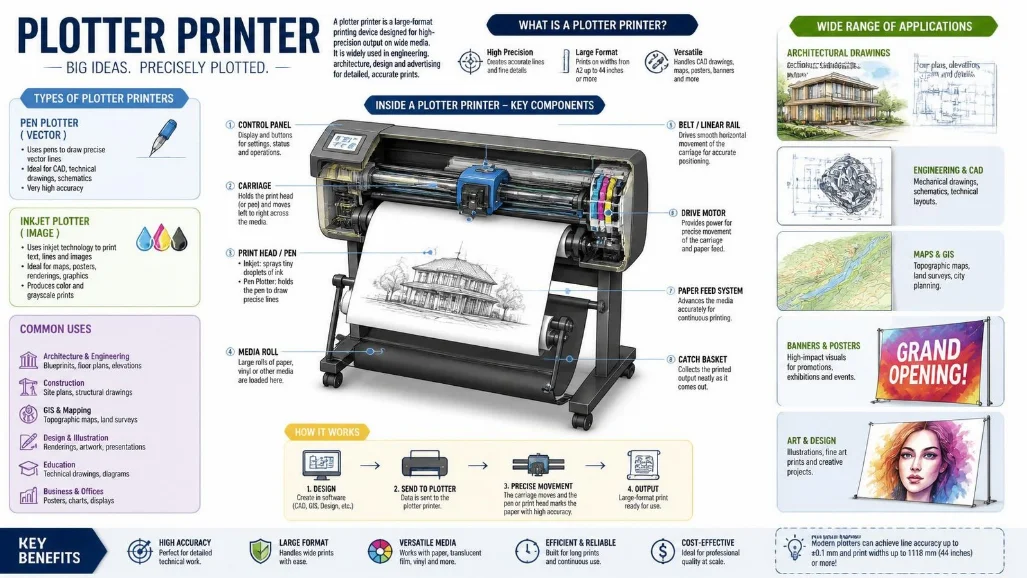
Direct answer: A plotter printer is a specialized machine for producing large, detailed drawings and graphics. Traditional plotters drew continuous lines with physical pens. Modern models usually use large-format inkjet technology for CAD plans, engineering diagrams, maps, posters, and other oversized documents.
What Is a Plotter Printer?
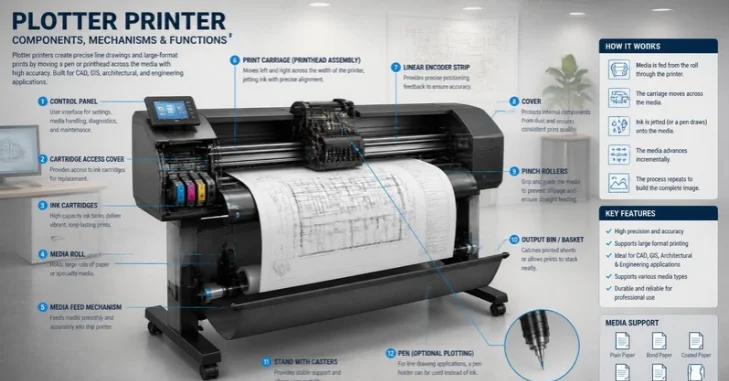
The Plotter Printer term originally described machines that physically drew computer-generated lines using automated pens. Those devices were well suited to vector drawings. Their mechanical movement allowed them to reproduce detailed technical designs at large sizes.
Today’s machines work differently. Most products sold for plotting use wide-format inkjet technology rather than mechanical pens. The historical name remains common because these devices perform many of the same technical printing jobs.
Modern equipment can also handle more than monochrome line drawings. Many machines produce detailed color graphics, maps, renders, presentation boards, and signage. This broader capability makes them useful beyond traditional engineering departments.
How Does Large-Format Plotting Work?
Older pen plotters interpreted computer instructions and moved a pen across paper. The movement created continuous lines based on vector commands. Flatbed and drum mechanisms were two common approaches.
Current machines normally move an inkjet printhead across wide media. Paper may come from a roll instead of a standard letter-size tray. This arrangement allows drawings several feet wide without splitting them across multiple sheets.
Software also matters in modern workflows. CAD applications can send scaled drawings using printer drivers or dedicated utilities. Preview, rotation, nesting, and job-management tools can reduce mistakes before large sheets are printed.
Plotter Printer vs. Regular Printer
A standard office printer and a plotting system can both use inkjet technology. Their intended jobs are still quite different. Size, media handling, workflow, and technical output requirements create the biggest distinctions.
| Feature | Plotting System | Standard Office Printer |
| Paper size | Large rolls and sheets | Mostly standard cut sheets |
| Typical width | 24–44 inches | Usually much smaller |
| Primary work | CAD, maps, plans, large graphics | Documents and everyday graphics |
| Media handling | Often roll-fed | Mostly tray-fed |
| Technical workflow | Strong CAD and large-format support | General office applications |
| Physical size | Medium to large | Usually compact |
| Purchase cost | Generally higher | Usually lower |
Regular printers remain better for letters, reports, invoices, and ordinary office documents. Large-format equipment becomes useful when scale and oversized media matter. Buying one for basic letter-size printing usually adds unnecessary expense and space requirements.
Specialized printers can also use completely different processes for specific materials. Techirya’s sublimation printer buying guide explains a system that transfers dye to suitable products using heat. That approach serves a different purpose from technical large-format printing.
Common Types of Plotters
The technology has changed considerably over time. Knowing the major categories helps explain both older terminology and current products. You may encounter several names while researching equipment.
Pen Plotters
Traditional pen systems physically draw lines on the media. A mechanical assembly controls the pen’s movement. These machines played an important role in early computer-aided drafting.
They are now uncommon in normal commercial printing environments. Faster digital printing technologies replaced them for most applications. Older equipment may still appear in specialist, educational, or hobby settings.
Flatbed Plotters
A flatbed design keeps the media on a stationary, flat surface. A drawing mechanism moves across that surface. This approach can support precise drawings without continuously feeding the material.
Flatbed systems historically suited technical drawings and specialized graphics. Their physical footprint can become substantial as output size increases. Modern buyers usually encounter different technologies when shopping for general CAD printing.
Drum Plotters
Drum designs wrap or feed paper around a rotating cylindrical component. The drum controls movement along one axis. A pen mechanism handles movement in the other direction.
This design reduced some space requirements compared with large flatbed systems. It belongs mainly to the historical development of plotting equipment. Modern wide-format inkjet devices now dominate everyday professional use.
Modern Inkjet Plotters
This is the category most U.S. buyers will encounter today. These machines use inkjet printheads and large media rolls. Common widths include 24, 36, and 44 inches.
They can reproduce fine technical lines while also printing photographs, graphics, and colored presentation material. Current systems may include Wi-Fi, Ethernet, touchscreens, automatic cutting, and cloud-connected workflows. Some models also combine printing, scanning, and copying.
What Is a Plotter Printer Used For?
Architecture remains one of the most recognizable applications. Firms print floor plans, elevations, construction drawings, and presentation boards. Large media keeps complex plans readable without dividing them into small pages.
Engineering teams use the equipment for schematics, mechanical drawings, infrastructure plans, and technical diagrams. Construction teams can produce site plans and working drawings. Accurate scaling matters because these documents often communicate dimensions and project details.
GIS departments and public agencies also print large maps and geographic information. Schools may use wide-format equipment for technical coursework and posters. Creative businesses can produce graphics, signs, displays, and presentation material with suitable media.
Other specialized machines handle three-dimensional manufacturing rather than paper output. Readers exploring that technology can review Techirya’s guide to 3D printer filament materials for an overview of materials used in additive printing. These systems create physical objects instead of technical drawings on paper.
Choosing the Right Large-Format Printer
Start with the documents you produce rather than comparing model names. A small architecture office has different needs from a busy construction department. Matching the machine to your workload can prevent unnecessary spending.
Choose the Correct Print Width
Print width should be one of your first decisions. A 24-inch device works well for many smaller technical sheets. Wider 36-inch machines support larger architectural and engineering documents.
A 44-inch machine provides more room for graphics and specialized output. Bigger isn’t automatically better. Wider equipment costs more and occupies additional workspace, so choose the smallest size that reliably handles your work.
Check Line Quality and Accuracy
Technical drawings need clean lines and readable small text. Fine details can become difficult to interpret when output quality is poor. Review specifications and sample output before choosing equipment for professional CAD work.
Resolution alone does not tell the entire story. Line accuracy, ink behavior, media quality, and software handling also affect output. Consider the complete workflow instead of comparing only the largest DPI number.
Consider Printing Speed
Speed matters when your team prints many drawings each day. A few extra seconds per sheet can become significant across large project batches. Manufacturers often provide estimated times for standard technical sheet sizes.
Do not evaluate speed without considering quality settings. Draft modes may print faster than higher-quality settings. Your normal workload provides the most useful basis for comparing productivity.
Compare Ink Systems and Running Costs
The purchase price is only one part of ownership. Ink, printheads, maintenance items, and paper create continuing expenses. High-volume users should pay close attention to those costs.
Check cartridge or tank capacity before purchasing. Consider how frequently your office expects to print color material. A cheaper machine may become costly if its supplies do not match your workload.
Review Connectivity and Software
Modern offices rarely depend on one computer connected by a cable. Wi-Fi and Ethernet support can make shared printing easier. Some models also support mobile or cloud-connected workflows.
A reliable network becomes more important when several employees send large files to shared equipment. Techirya’s guide to choosing a Wi-Fi router for better coverage can help if wireless performance is part of your office setup. Wired Ethernet may still be preferable for predictable connections in demanding environments.
Software deserves equal attention when comparing machines. Preview tools can catch orientation, scaling, and layout mistakes before printing. Batch processing and automatic media handling can also save time in busy offices.
Decide Whether You Need Scanning and Copying
Printer-only machines usually cost less and require less space. They make sense when your drawings already exist digitally. Many teams never need an integrated scanner.
Multifunction models become valuable when paper drawings still move through your workflow. They can digitize, copy, and reproduce large documents. Construction, architecture, and engineering offices may find those capabilities especially useful.
24-Inch vs. 36-Inch vs. 44-Inch Models
A 24-inch machine is often practical for smaller offices and moderate technical printing. It can handle common CAD work without demanding as much floor space. These models can also have lower entry prices than wider professional systems.
A 36-inch model suits teams that regularly produce larger architectural plans. This width supports larger drawing formats without reducing their scale. It can be a useful middle ground for established AEC operations.
A 44-inch system targets larger graphics and demanding production needs. Designers and technical teams may appreciate the added media flexibility. Buyers should confirm they need that width before accepting the extra equipment and supply costs.
Advantages and Limitations
Large-format technical printers offer clear benefits for organizations producing oversized work. They can keep drawings on one sheet and preserve small details. Roll media also supports document sizes that normal office equipment cannot accommodate.
The main drawbacks are cost, space, and supplies. These machines require more room than desktop printers. Large rolls, ink, maintenance, and occasional servicing also increase ownership expenses.
Your print volume determines whether ownership makes financial sense. Frequent printing can make an in-house machine convenient and efficient. Occasional users may find outsourced large-format printing more practical.
Should You Buy One or Outsource Large-Format Printing?
Consider how often your organization needs large prints. Regular daily or weekly output can justify having equipment nearby. Immediate access also helps when plans change shortly before meetings or site visits.
Outsourcing can make sense for businesses with occasional needs. You avoid hardware costs, maintenance, storage, and supply management. A local print provider may also offer equipment beyond what a small business could justify purchasing.
Compare annual outsourcing costs against realistic ownership costs. Include ink, paper, maintenance, electricity, and staff time. That calculation gives you a better answer than comparing purchase prices alone.
Frequently Asked Questions
What is a plotter printer?
A plotter printer creates large technical drawings, plans, maps, and graphics. Traditional versions used physical pens controlled by computer commands. Most current models instead use wide-format inkjet technology and roll-fed media.
Is a plotter the same as a printer?
A plotter is a printing device, but its traditional operating method differed from ordinary printers. Historical machines drew continuous lines using pens. Current products often use inkjet technology while retaining large-format and technical-printing capabilities.
What size paper does a plotter use?
Common modern widths include 24, 36, and 44 inches. Many machines accept rolls rather than only individual sheets. Exact supported sizes vary by model, so always check manufacturer specifications before buying.
Who needs a plotter?
Architects, engineers, contractors, GIS professionals, designers, educators, and technical departments are common users. They often need documents larger than normal office printers can produce. The equipment is especially useful when detailed lines and readable large-scale drawings matter.
Can a plotter print photos and posters?
Many modern wide-format inkjet models can print graphics, posters, and color images. Results depend on the ink system, media support, and intended application. A CAD-focused machine may not match a dedicated graphics printer for photographic work.
How much does a plotter printer cost?
Prices vary widely by width, features, speed, scanning capability, and intended workload. Entry-level technical models cost much less than high-volume multifunction systems. Compare current U.S. pricing after identifying the specifications your workflow requires.